
Payment files – risks and measures
Manual steps in the payment process always involve a risk
Any activity that requires manual work to complete a task poses a security risk. A common example of a security breach is when a supplier payment is initiated. First, standardized payment files are created in the business system. The payment files are exported to a directory on the server or network and are then often left there for a while until they are distributed manually by one or more employees in the organization.
This poses a security risk because the contents of payment files can easily be changed in a standard text editor. Anyone who has access to the file can change both the recipient and the amount in an unprotected payment file. Open the file in Notepad, change the giro/account number and amount of a transaction, and save. It's that easy to manipulate transactions, and there are no traces left of who changed the file!
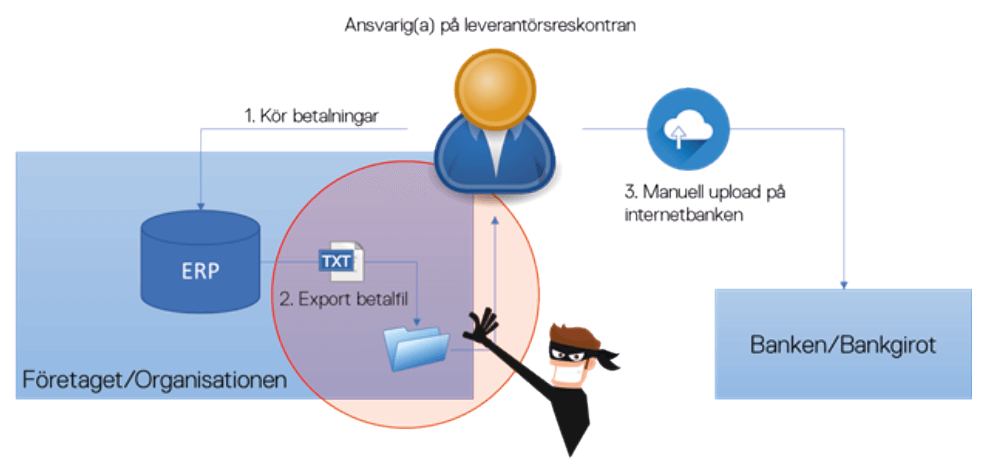
See the simplified process diagram below. This is a typical traditional (insecure and inefficient) flow for supplier payments and other payment orders.
- Payments initiated
- The financial system exports unprotected payment files to a directory on the server or network.
- The employee retrieves and uploads the payment file from the online bank.
Risks
- Who has access to directories containing payment files?
- The payment files (simple text files with amounts, account/giro in plain text) are unprotected.
- Anyone who has access to the payment files can manipulate the content of the file (amount, giro or account) in a standard text editor (e.g. Notepad) without being detected.
- If the file has been manipulated, it is unlikely that the person certifying the file in the online bank will detect this.
But it is possible to minimize the risks, even eliminate them entirely.
Measures
-
- Review and verify permission levels on directories containing payment files. Ensure that very few people (if any) have permission to access the directory.
- Use software that seals/protects against changes or encrypts payment files directly when exporting from the financial system.
- All payment files sent to Bankgirot must be protected against changes using, for example, an HMAC seal.
- Depending on the payment order and which bank you use, the encryption options may vary. Check with your bank.
- In addition to Betalkontroll, there are several other providers of software for sealing and/or encryption. For example, https://www.zavanto.se/hmac-for-bankgirot/ can be downloaded and tested free of charge for 30 days.
- Automate the flow – send payment orders/files automatically directly to the bank or Bankgirot.
See the simplified process diagram below. This is an example of a secure and efficient process for payment orders.
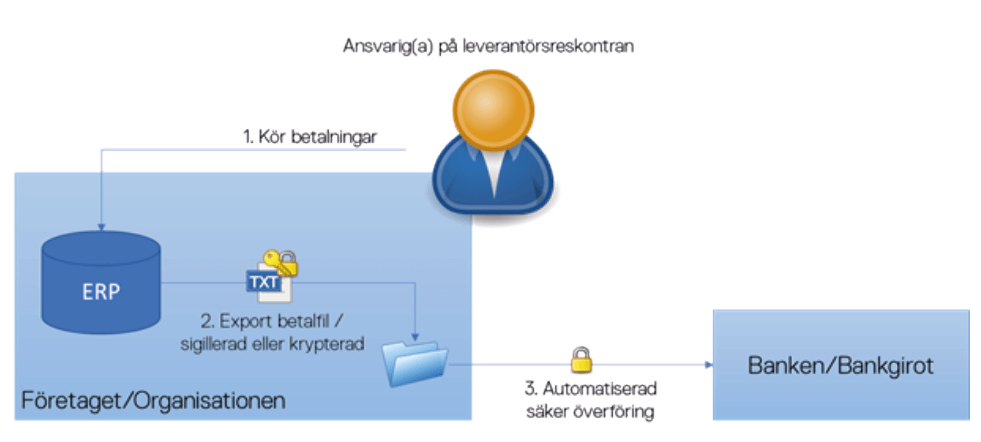
In addition to the process now being secure, a significant amount of time is saved that was previously spent manually uploading files for various companies in the group several times a week. If the files are sent directly to Bankgirot, there may also be advantages in terms of later cut-off times, etc.
Sealing/change protection VS encryption
Change protection/file sealing
- Content can still be read
- The recipient (bank/bankgirot) rejects the file if changes have been made to its content since it was protected against modification.
File encryption
- The content cannot be read
- Only the recipient (the bank) can decrypt/read the file with a private key.